Saturn Nook app icon Free for the first 50 people · 50 left

Your business, living in your notch

Saturn Nook turns the notch on your MacBook into a small dashboard for running client work. Hover over it to see your clients, today's to-dos, a billable-hours timer, your calendar and your music, then move away and it tucks itself back in.

Saturn Nook is a Mac app. Claim your copy here, then send the link to yourself to open on your Mac.

Free for the first 50
macOS 14 Sonoma or later
Apple Silicon and Intel
Your data stays on your Mac
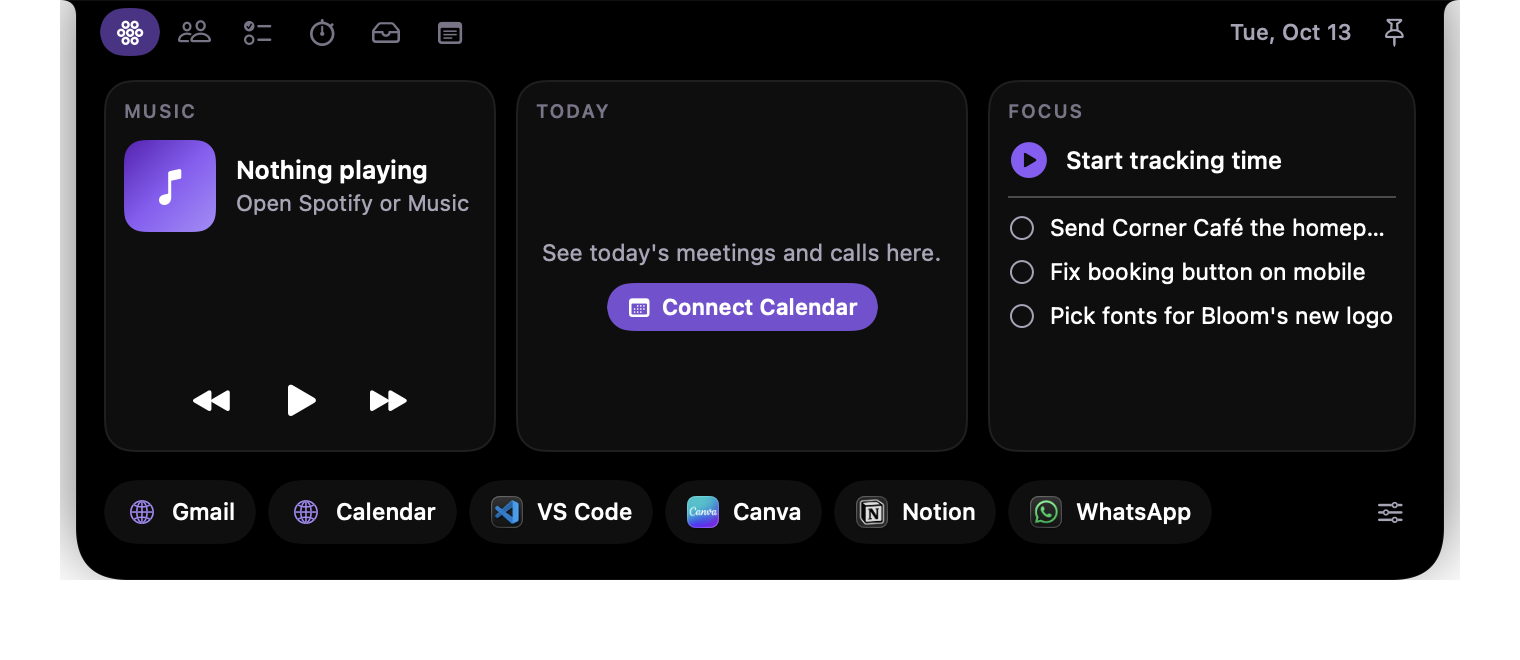
Saturn Nook home tab showing music, today's calendar, focus tasks and quick launch

Music, today's meetings, your next tasks and one-click launchers for the apps you use most.

What's inside

Built for people who run client work. Everything one hover away.

We built Saturn Nook for ourselves, to stop losing track of hours and to-dos across a dozen client sites. It worked well enough that we're giving it away.

Clients and projects

Every client with a status from lead to live, their website, project folder, hourly rate and notes. Open their site, folder or code in one click.

Billable-hours timer

Start a timer per client. It keeps running beside the notch, adds up the week in pounds, and exports a timesheet ready for invoicing.

Tasks by client

Type a to-do, press Return, tag it to a client. Your next three show on the home tab so nothing slips.

Calendar and music

Today's meetings from your Mac's calendar, plus play, pause and skip for Spotify or Apple Music.

File shelf

Drag logos, mockups or invoices onto the notch to park them, then drag them back out into an email or WhatsApp. AirDrop is built in.

Shortcuts

Your own grid of buttons for the sites, files and apps you open all day, grouped and colour coded however you like. Set it up once in a small settings file and it is always one hover away.

Notes and quick launch

A scratchpad for call notes with one-click timestamps, and a row of buttons for the apps and sites you open all day.

Free for the first 50

Claim your free copy. Only 50 are free.

Pop your name and email in and the download unlocks straight away. On your phone? You can send the link to yourself and open it on your Mac.

We'll only use your email to reply if you get in touch, or for tips if you tick the box above.

Install in a minute

Four steps. One of them is a macOS security check.

  1. Claim, download and unzip

    Claim your free copy with your email, then click Download for Mac. Your Mac unzips it into Saturn Nook in your Downloads folder.

  2. Move it to Applications

    Drag Saturn Nook into your Applications folder in Finder.

  3. Allow it the first time

    Double-click it. macOS will say it can't check the app for malicious software. Click Done, open System Settings › Privacy & Security, scroll down and click Open Anyway next to Saturn Nook, then confirm. You only do this once.

  4. Hover over your notch

    That's it. Move your pointer to the top-middle of the screen and the Nook slides open. The ⬡ icon in your menu bar has Launch at Login, so it's there every time you start your Mac.

Why the security step? Apple shows that message for apps that aren't sold through the App Store or registered with Apple's paid developer programme. Saturn Nook is a small free tool, so it isn't yet. It doesn't connect to the internet and never sends your data anywhere.

Questions

Good to know

Does my Mac need a notch?

No. On a Mac without a notch, or on an external monitor, Saturn Nook sits as a small black tab at the top-middle of the screen and opens the same way when you hover over it.

Is there a Windows version?

Not at the moment. Saturn Nook is built with Apple's own tools, so it only runs on a Mac. If you'd use a Windows version, email us and we'll let you know if we make one.

Where is my data stored?

Only on your Mac, in ~/Library/Application Support/SaturnNook. There's no account, no cloud sync and no tracking. Back up that folder to keep your clients, tasks and hours.

Why does it ask for Calendar and Spotify access?

Calendar access shows today's meetings on the home tab. Spotify or Music access lets the play, pause and skip buttons work. Both are optional, and you can change them any time in System Settings › Privacy & Security.

Is it really free?

It's free for the first 50 people who sign up, with no trial, upgrade or ads. Once the 50 free copies are gone, you can join the waitlist and we'll email you when it's available again.

How do I remove it?

Click the ⬡ icon in the menu bar and choose Quit, then drag Saturn Nook from Applications to the Bin. To remove your data as well, delete the SaturnNook folder in ~/Library/Application Support.

Something isn't working

Email contact@saturnresults.com with your Mac model and what happened, and we'll take a look.

Saturn Results

Want a tool built around how your business works?

We build websites, booking systems and small apps like this for UK businesses. Tell us what slows you down and we'll show you what we'd build.